Built by Cabinet Makers · Made in Australia

Design the kitchen.
Cut it the same day.

Rooms, cupboards, benchtops, quotes, cut lists, sheet optimising and CNC files – one program, set up the way cabinet shops actually build.

Buy once, own it – no subscription · Windows · CNC included
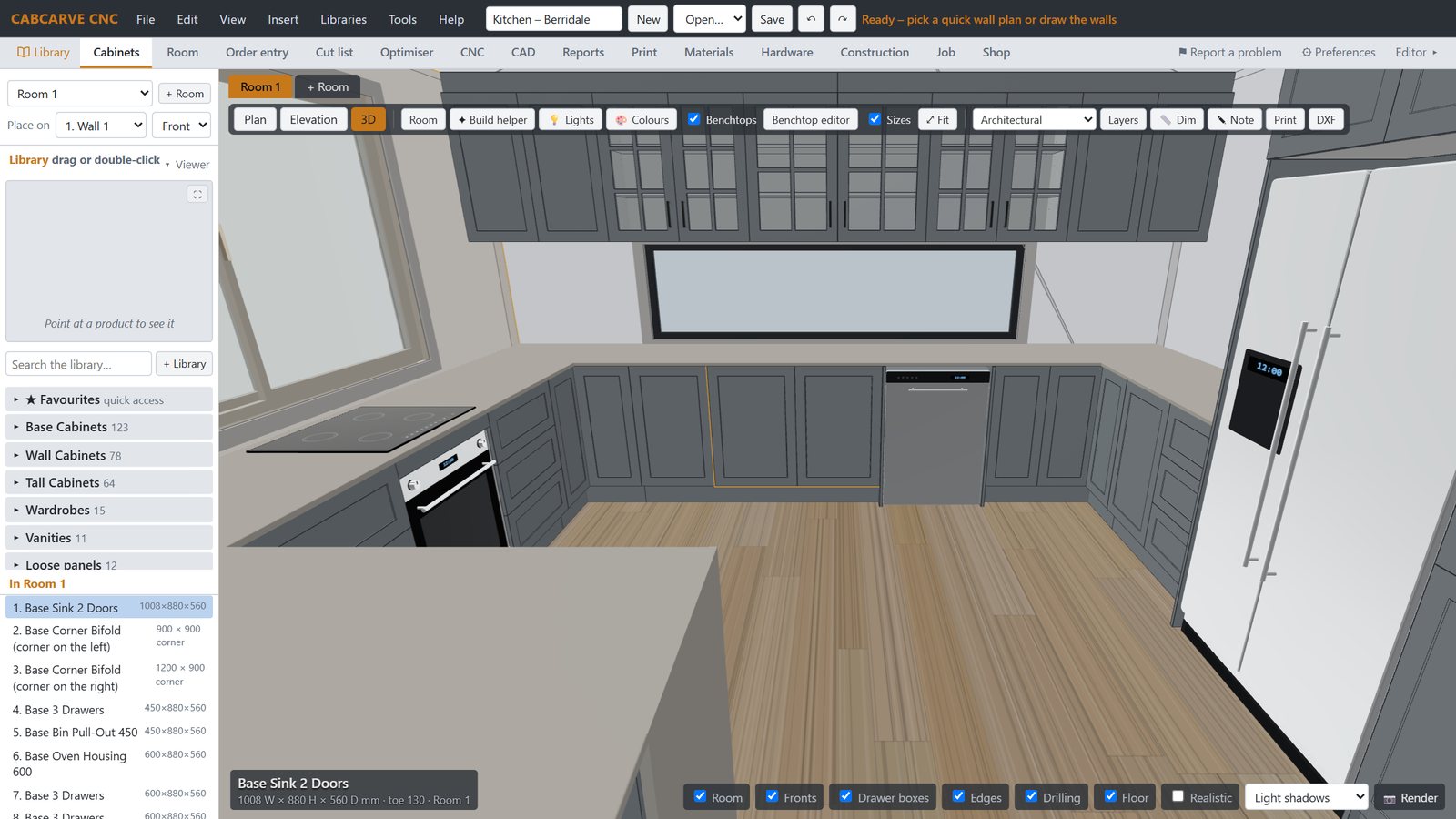
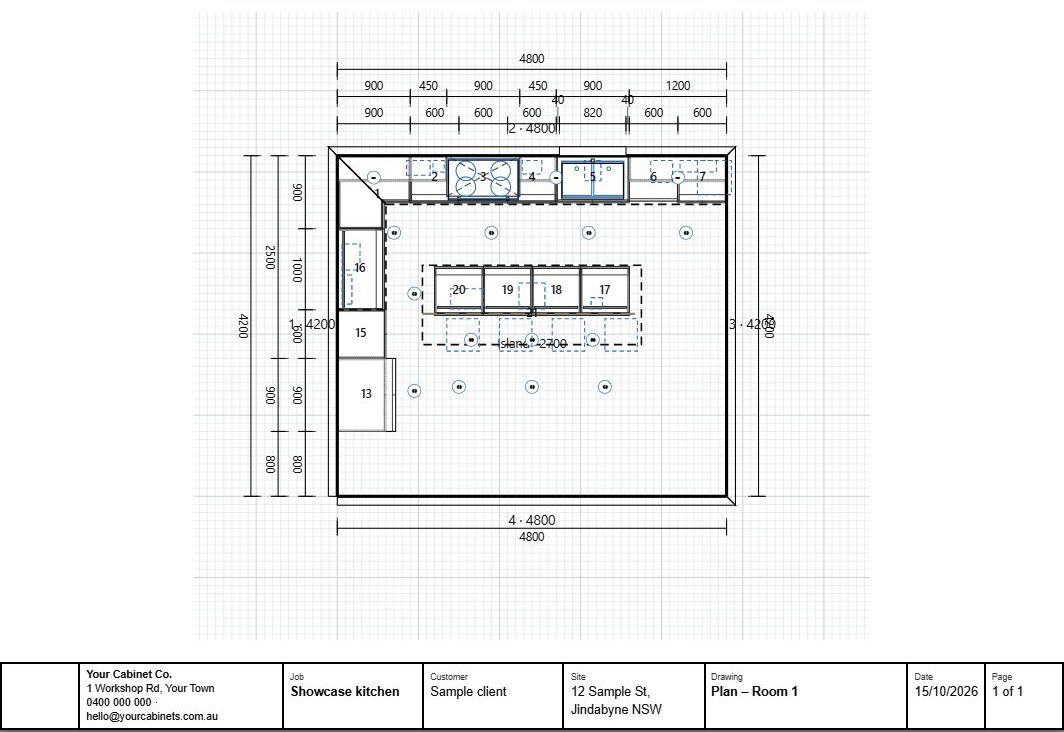
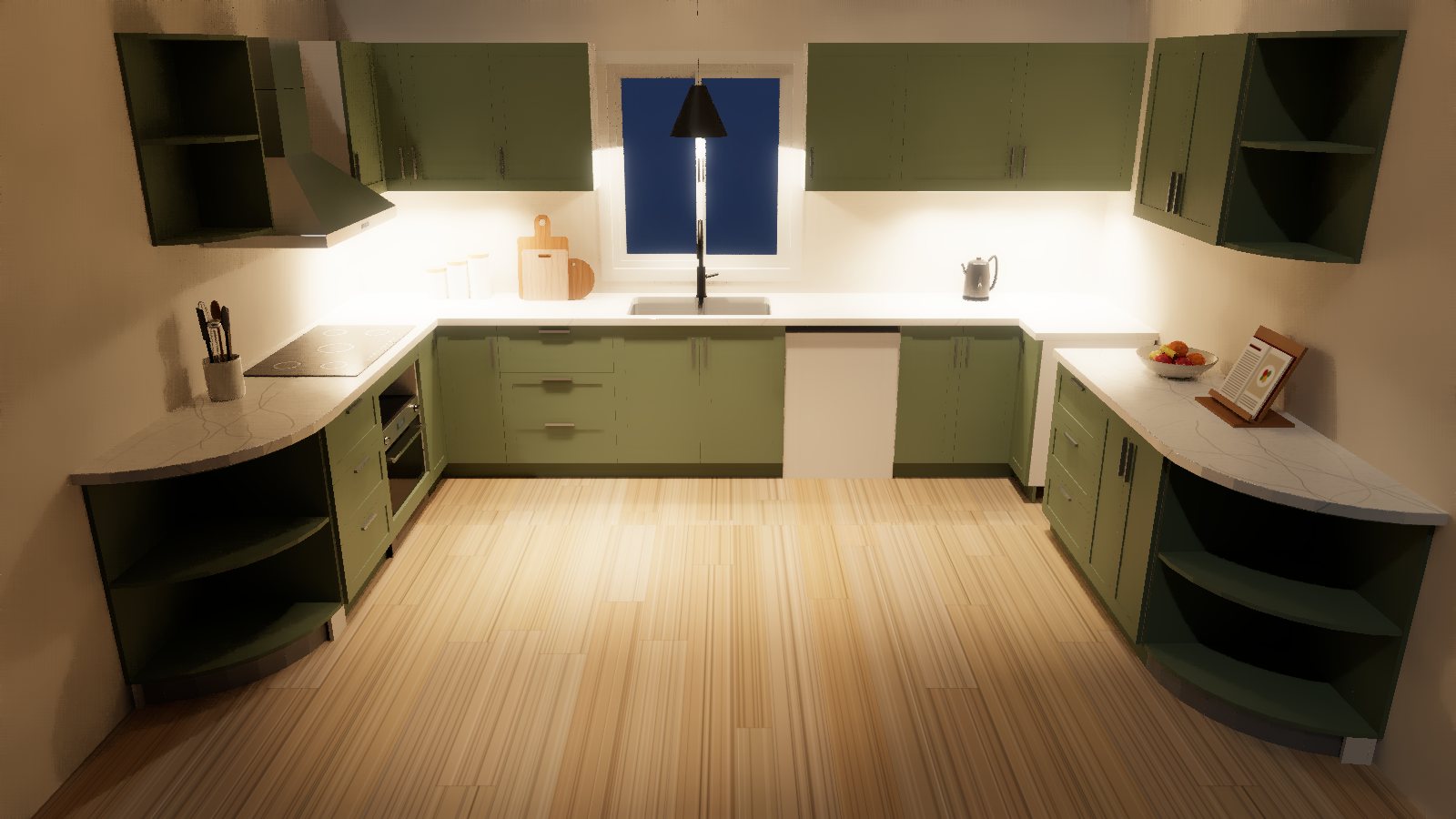
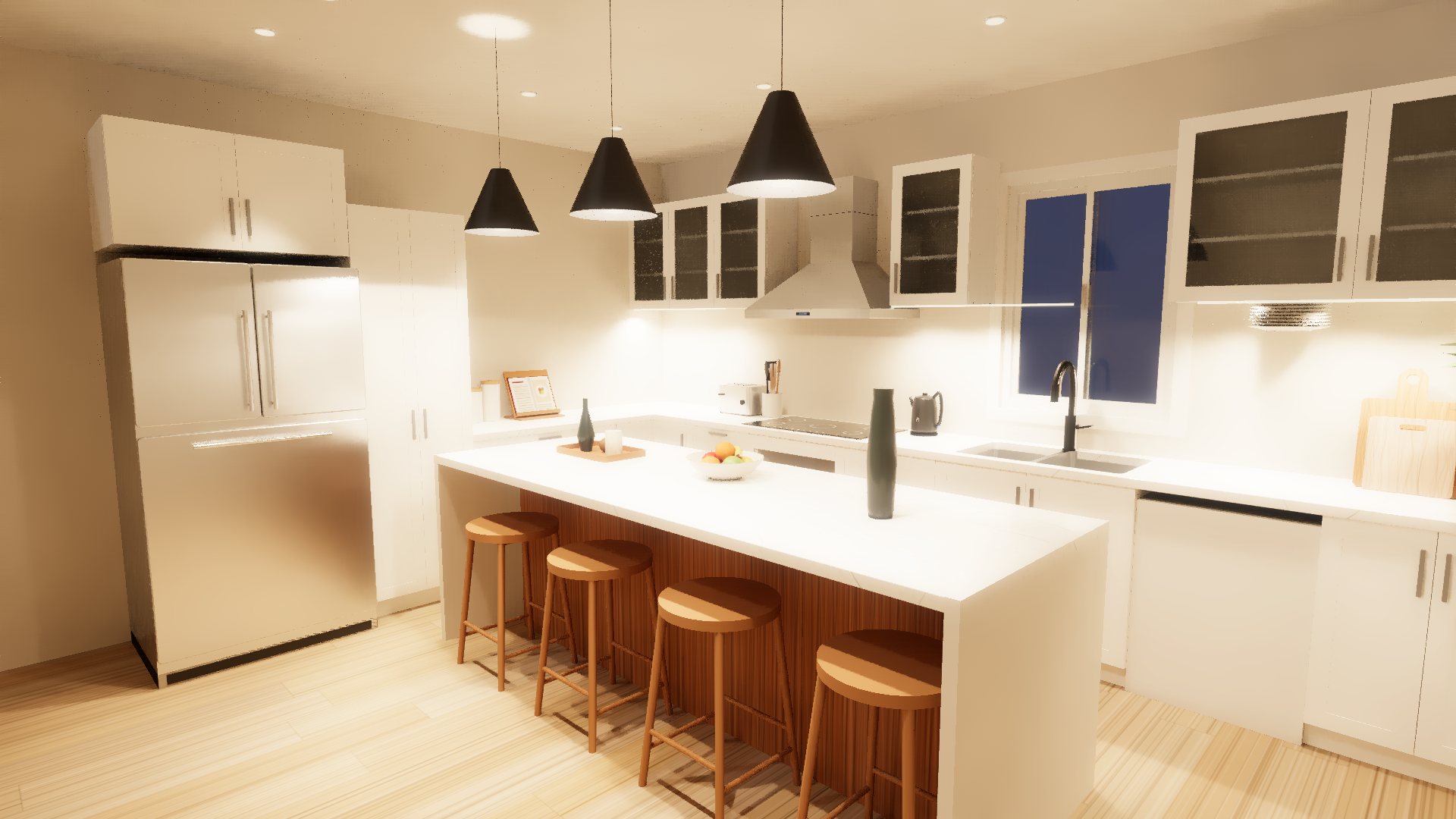
A kitchen rendered in CabCarveCNC The same kitchen in the program
The render, and the same kitchen in the program
📐Room to CNC in one place
Real hardware & drilling
🪵Your boards, your rules
🔑Buy once – no subscription
How it works

From a blank wall to cut parts

Four steps, one program. No exporting between apps, no re-typing sizes, no surprises on the saw.

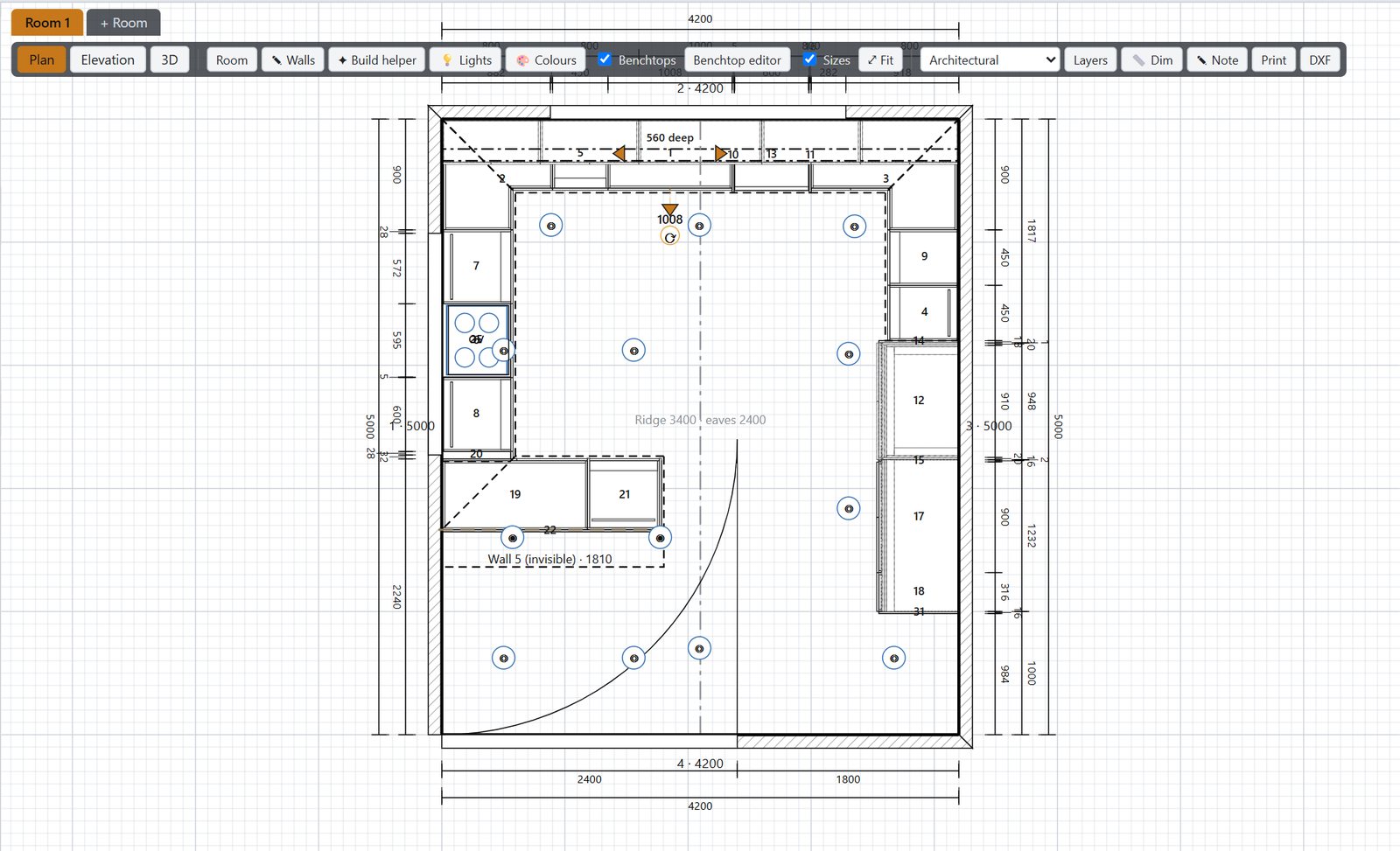
Room plan
1Draw the room

Walls, windows, doors and appliances – then drag cupboards straight on.

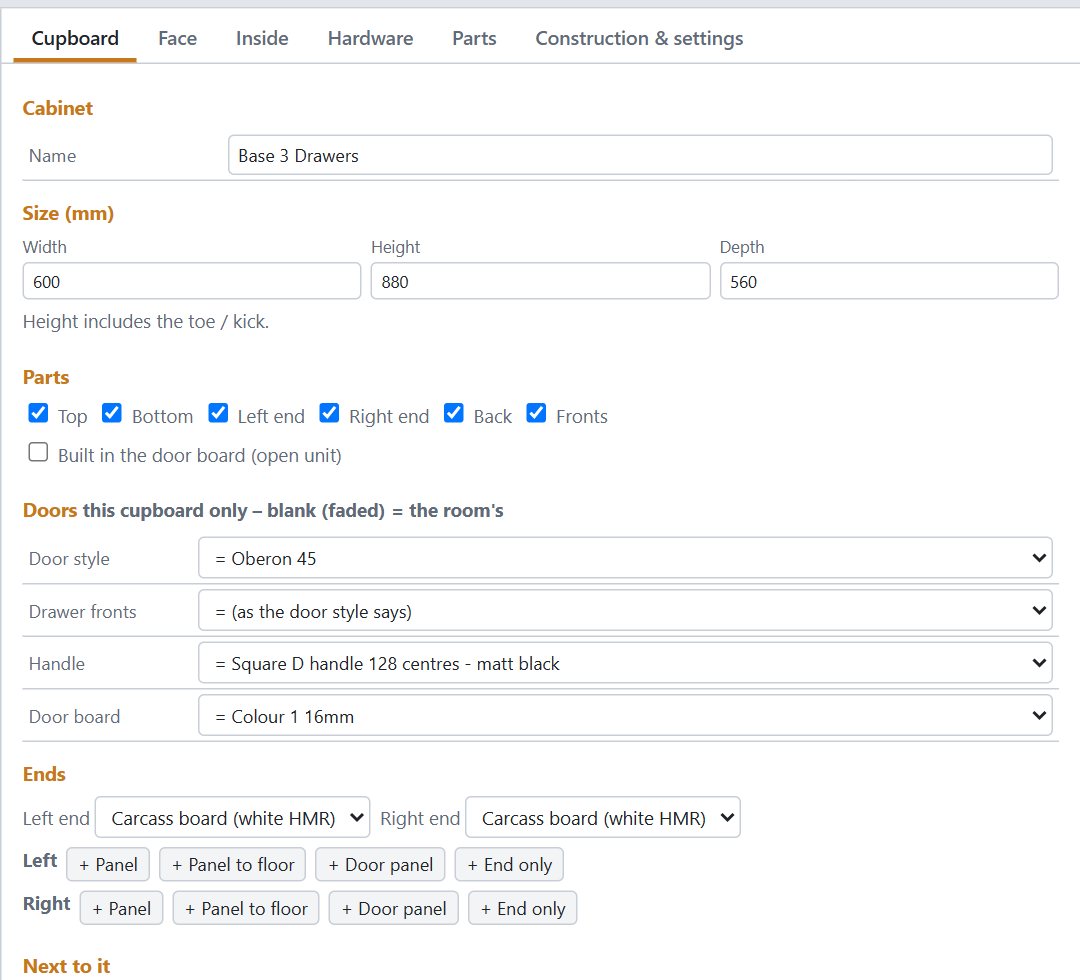
Cupboard editor
2Build every cupboard

Doors, drawers, panels, kicks and tops sized for you – change anything.

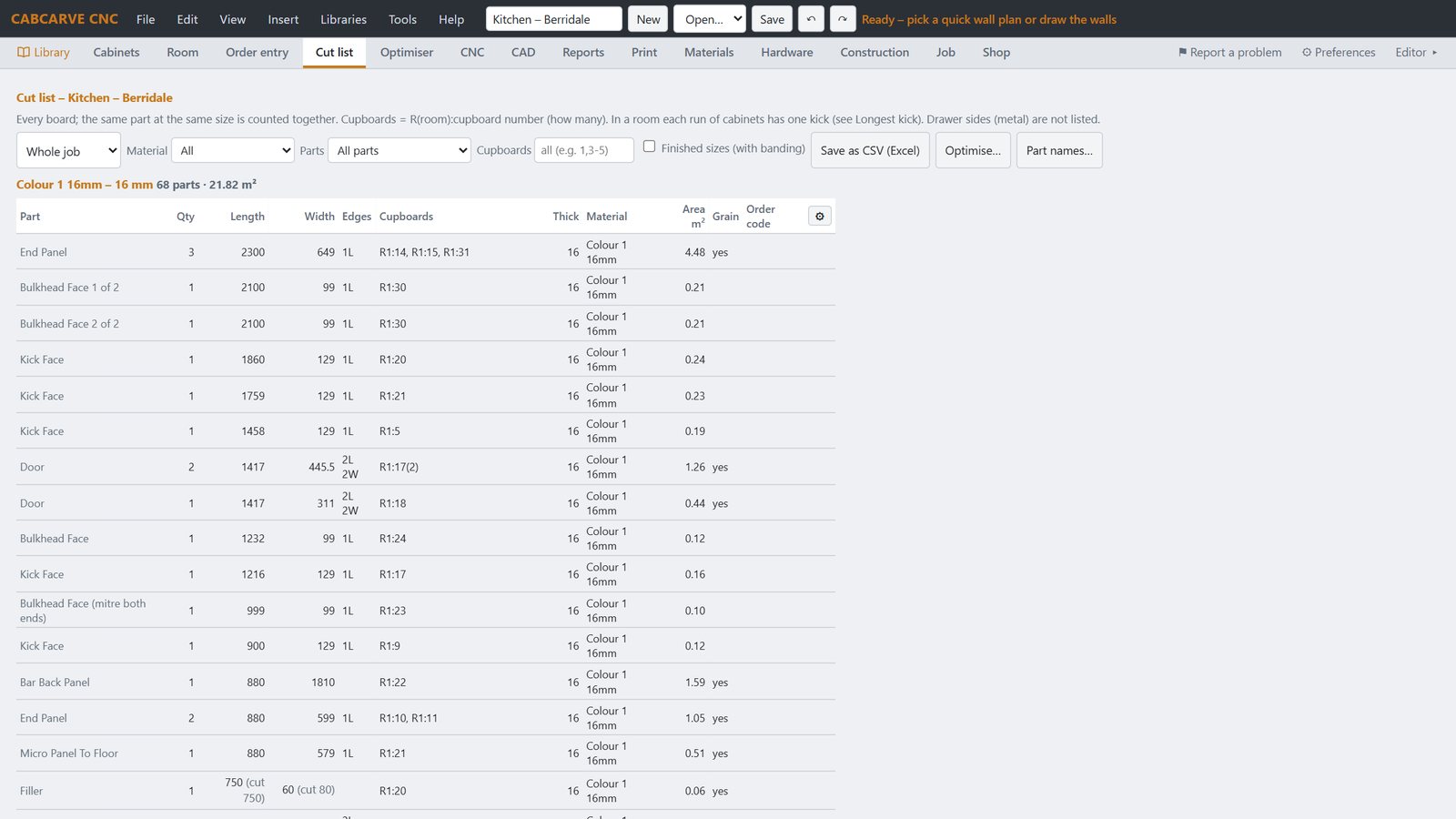
Cut list
3Cut list & labels

Every board with edging and grain, labels ready for the workshop.

Sheet optimiser
4Optimise & cut

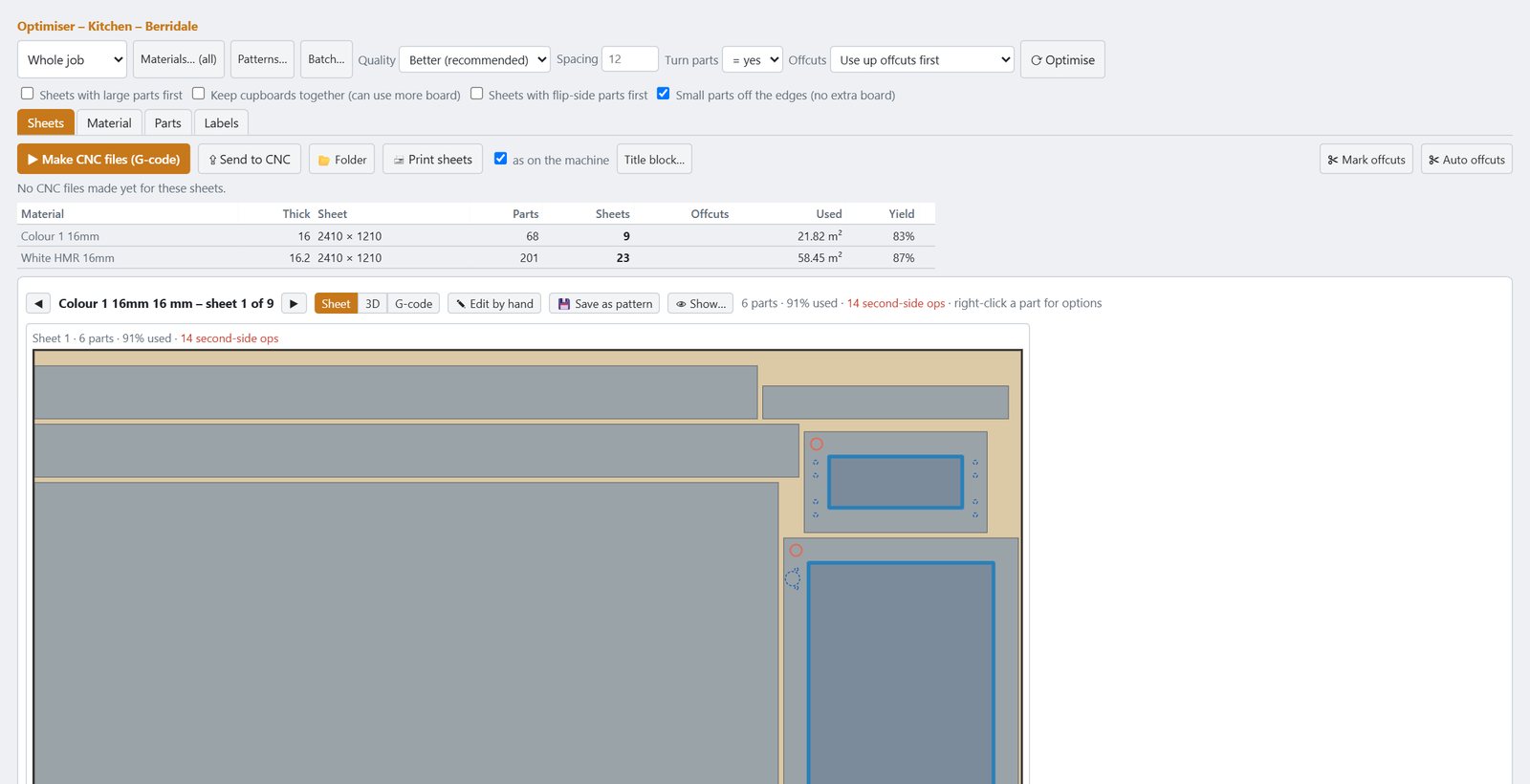
Parts nested to save board, then a CNC program for every sheet.

Cupboards

Every cupboard, your way

Set it up once like your shop builds, and every job comes out right.

  • Kick, bulkhead, reveal and benchtop sizes you choose
  • Hinges, runners and handles from real makers – drilled where they go
  • Corner units, ovens towers, microwave boxes, bi-folds and pull-outs
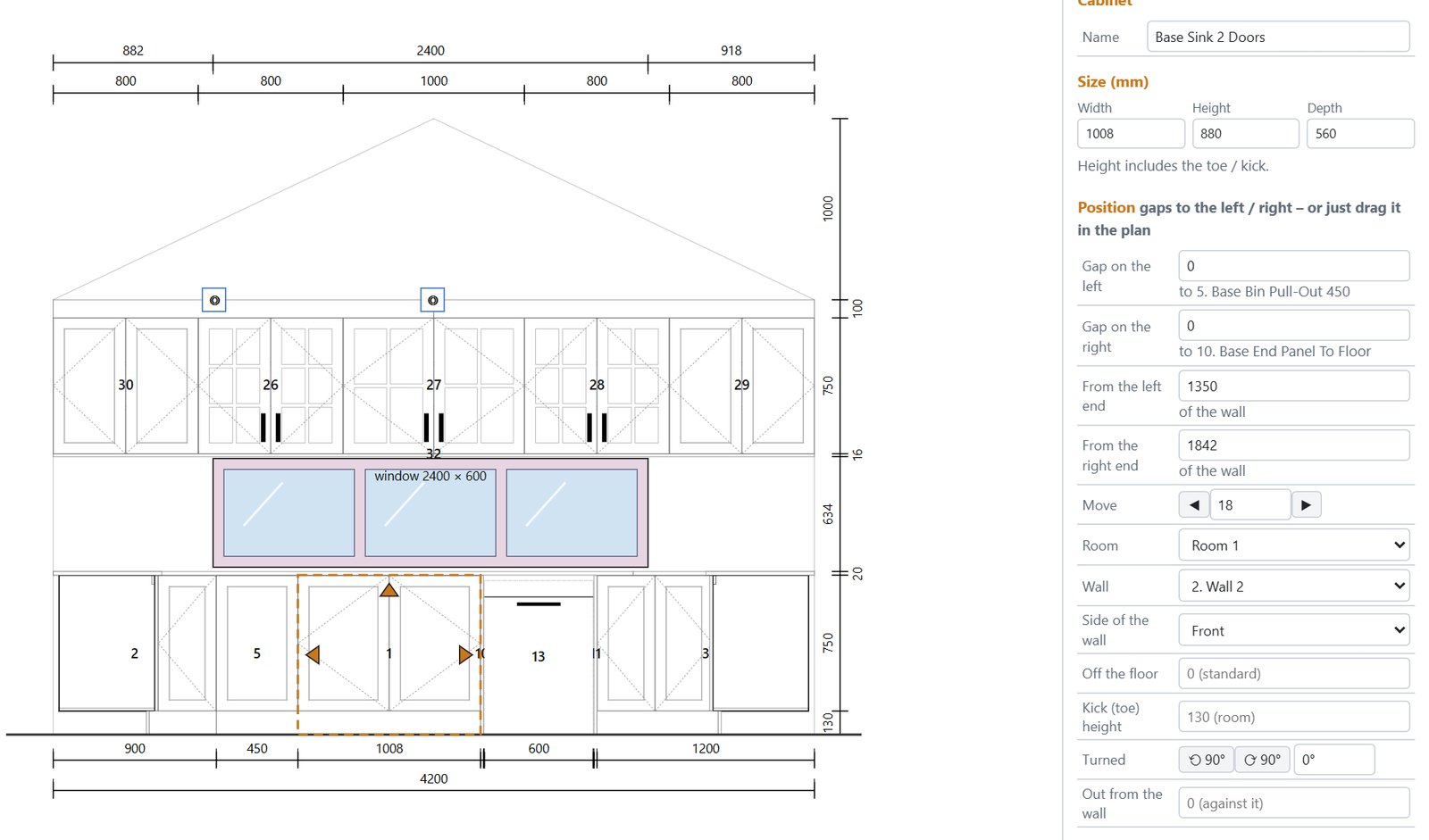
  • Gaps to the walls and neighbours always in view
  • Clean, dimensioned elevations – benchtop and under-panel thicknesses included
  • Change one cupboard without breaking the rest
Wall elevation with dimensions
The library

Everything for the job, in one place

A full library comes with the program – ready to drag into the room the day you install it. Add your own as you go, and it keeps growing.

  • Hundreds of ready-made cupboards: base, wall, tall, corner and appliance units, vanities, wardrobes, panels, kicks and bulkheads
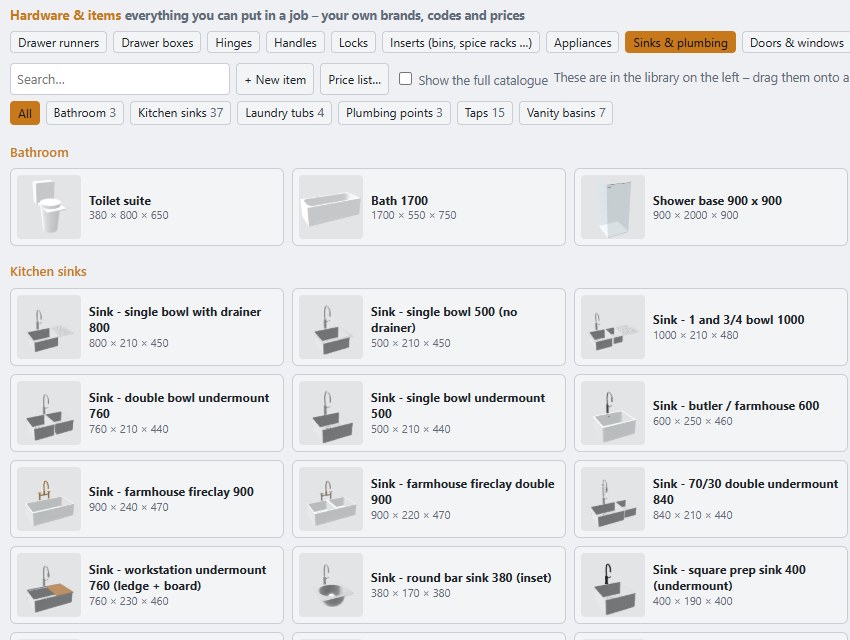
  • Appliances, sinks, taps, handles, hinges, runners, bins and inserts – drawn in 3D and straight onto the hardware list and quote
  • Doors, windows, lighting, furniture and décor to finish the room for the client
  • Your own libraries: save any cupboard or group of cupboards, add your own hardware with your codes and prices, load your supplier's price list
  • We keep working with suppliers to bring their ranges in as ready-made libraries – more added all the time

One stop for the whole job – design, hardware, quote and cut list without leaving the program.

The library: sinks, taps and bathroom items ready to drag into the room
Benchtops

Tops that join like the real thing

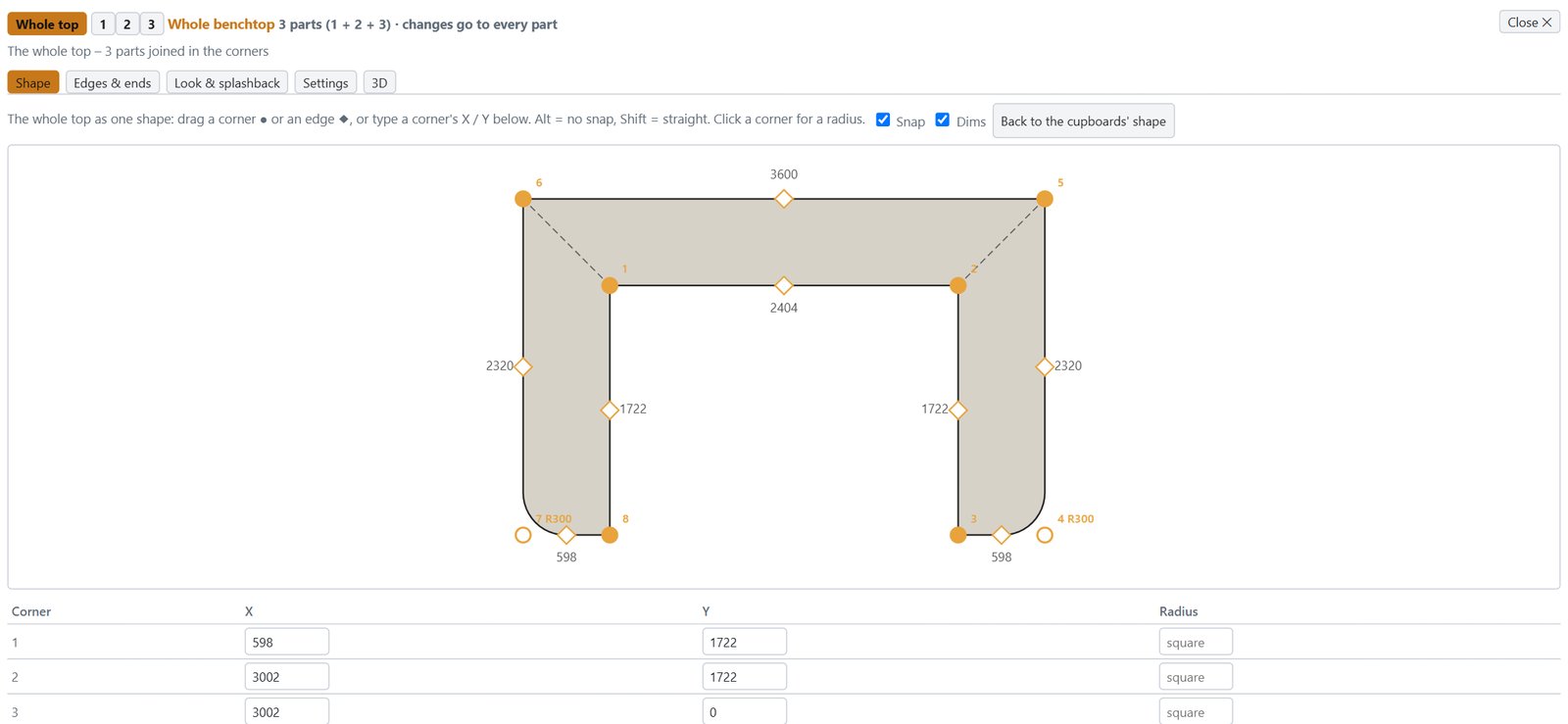
L and U shaped tops worked out for you – then shape them exactly how the stone mason will cut them.

  • Mitred or butt joins in the corners
  • Drag any corner or edge – snaps back to square
  • Radius corners for round end units and servery tops
  • Sink, cooktop and tap cut-outs that follow the appliances
  • Priced by the metre, square metre or whole slab
Whole benchtop editor
Make it yours

Your drawings, your colours, your look

The same room drawn four ways at the click of a button – and every one of them can be changed to suit how you work and what your clients like to see.

  • Architectural line drawings, shop drawings for the workshop, colour presentations for the client
  • Line weights, fonts, dimension style and colours set per style – make your own styles too
  • Layers: show or hide dimensions, door swings, numbers, lights, the grid
  • Board, door and benchtop colours and textures per room or per cupboard
  • The program itself in light or dark, or your own colours
  • Your logo, business details and title block on every page
The room plan drawn in the Architectural style
Print pages

Lay out your own print pages

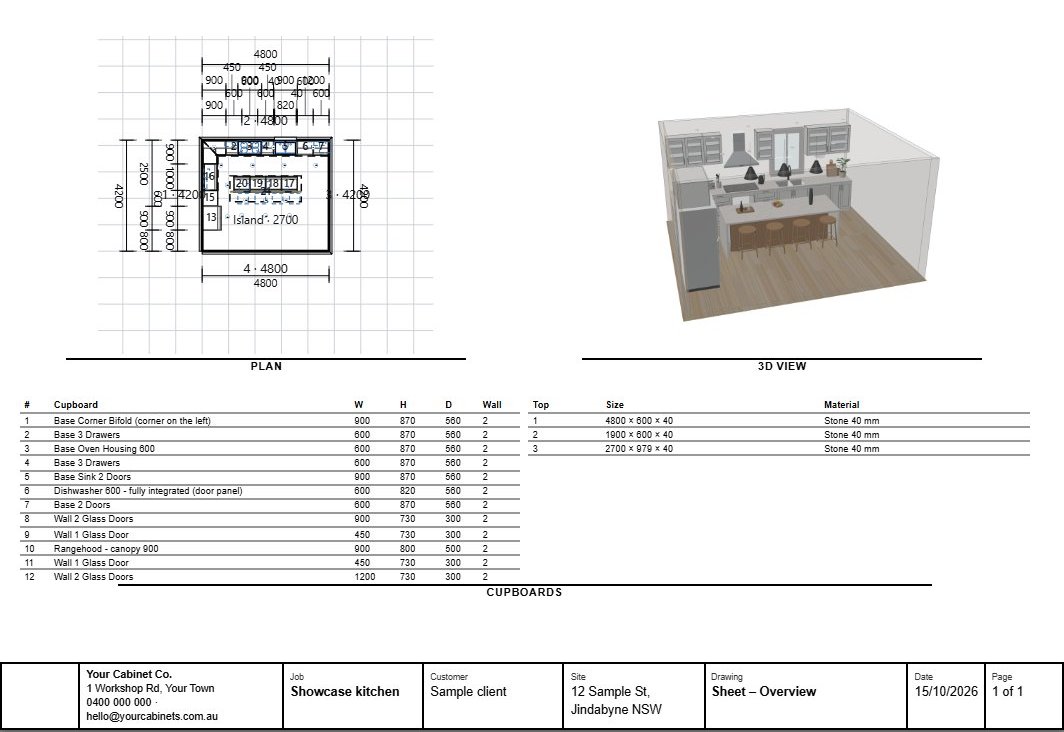
Put the plan, elevations, 3D view, benchtops, cupboard list and your notes together on one page – each in its own box, at its own scale.

  • Ready-made layouts: plan + elevations, plan + 3D + cupboard list, plan + benchtops
  • Drag and size the boxes, pick a standard scale (1:20, 1:50…) or fit to the box
  • Print sets: tick the pages you want and print the lot, or save one PDF
  • A4, A3, Letter or Tabloid, portrait or landscape
  • DXF of any drawing for the stone mason or the builder
A multi-view print page: plan, 3D view and cupboard list on one page
Quotes

A fully customisable quote

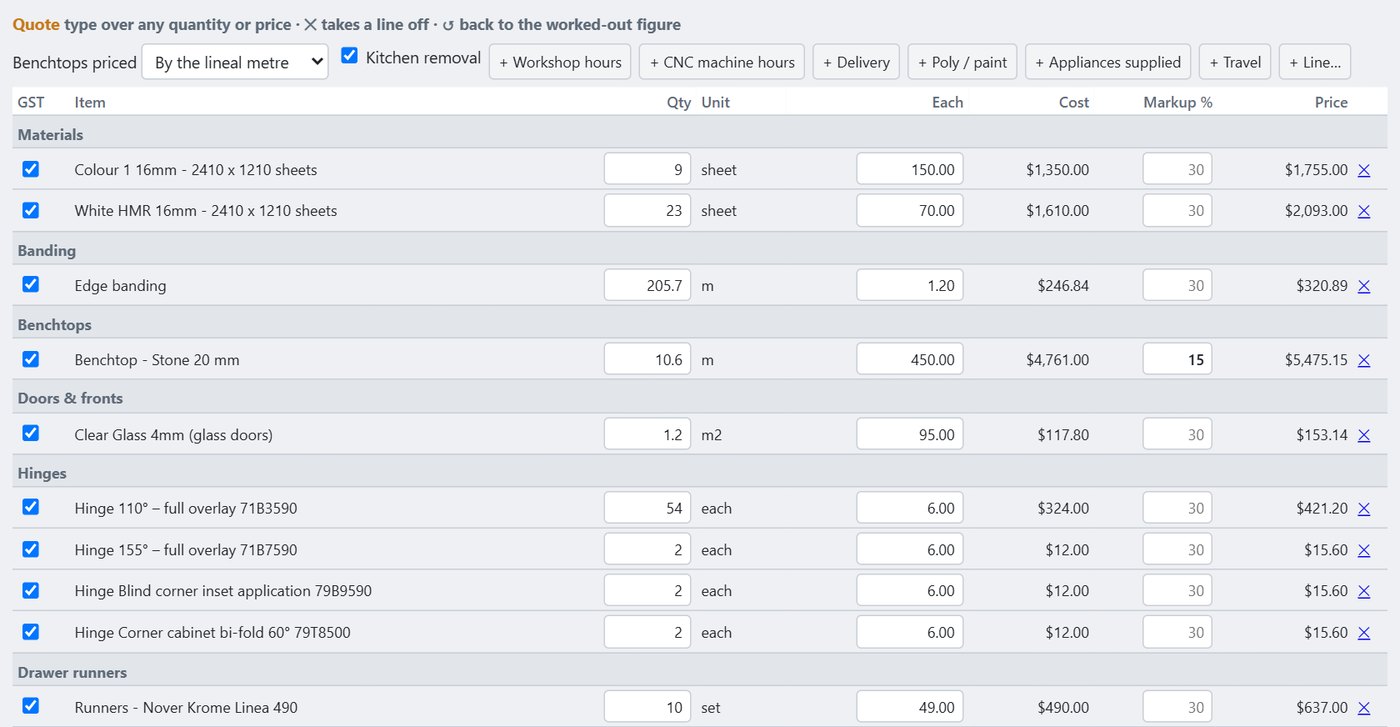
Everything in the job is counted and priced for you, item by item – then make it yours. Change any quantity or price, set a markup on any line, tick GST on or off, add your own lines.

  • Boards, edging and stone – by the sheet, metre, square metre or whole slab
  • Every hinge, runner, drawer box, handle and fitting on its own line, by type and part number
  • Markup per line, or one markup for each group
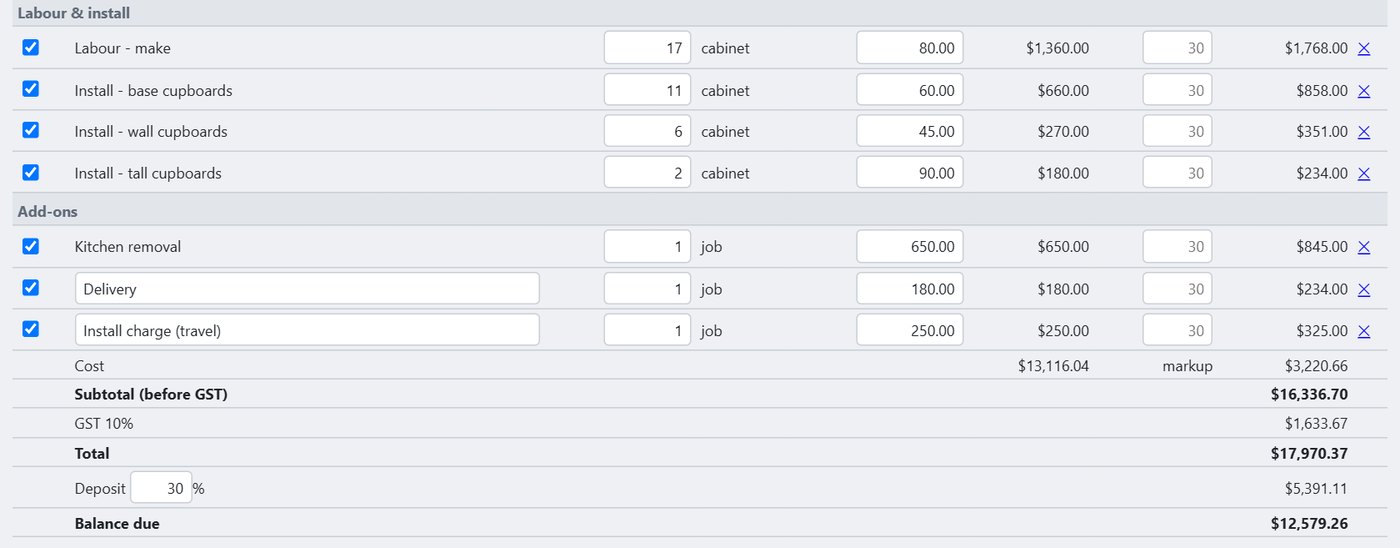
  • Make and install priced separately for base, wall and tall cupboards
  • Workshop hours, CNC time, delivery, poly / paint, kitchen removal and your own extras
  • Subtotal, GST, total, deposit and balance due – print it or save it as a PDF
Itemised quote: boards, hinges, runners, handles
Install, add-ons, GST, deposit and balance due
Built-in CAD & carving

A fully working CAD, built right in

Build the parts a cupboard library can't: curved and shaped pieces, one-off brackets and panels, signs and lettering, carved door centres and 3D shapes. Draw it or bring it in, choose the cutters, watch it cut on screen and send it to the machine. No second program to buy or learn.

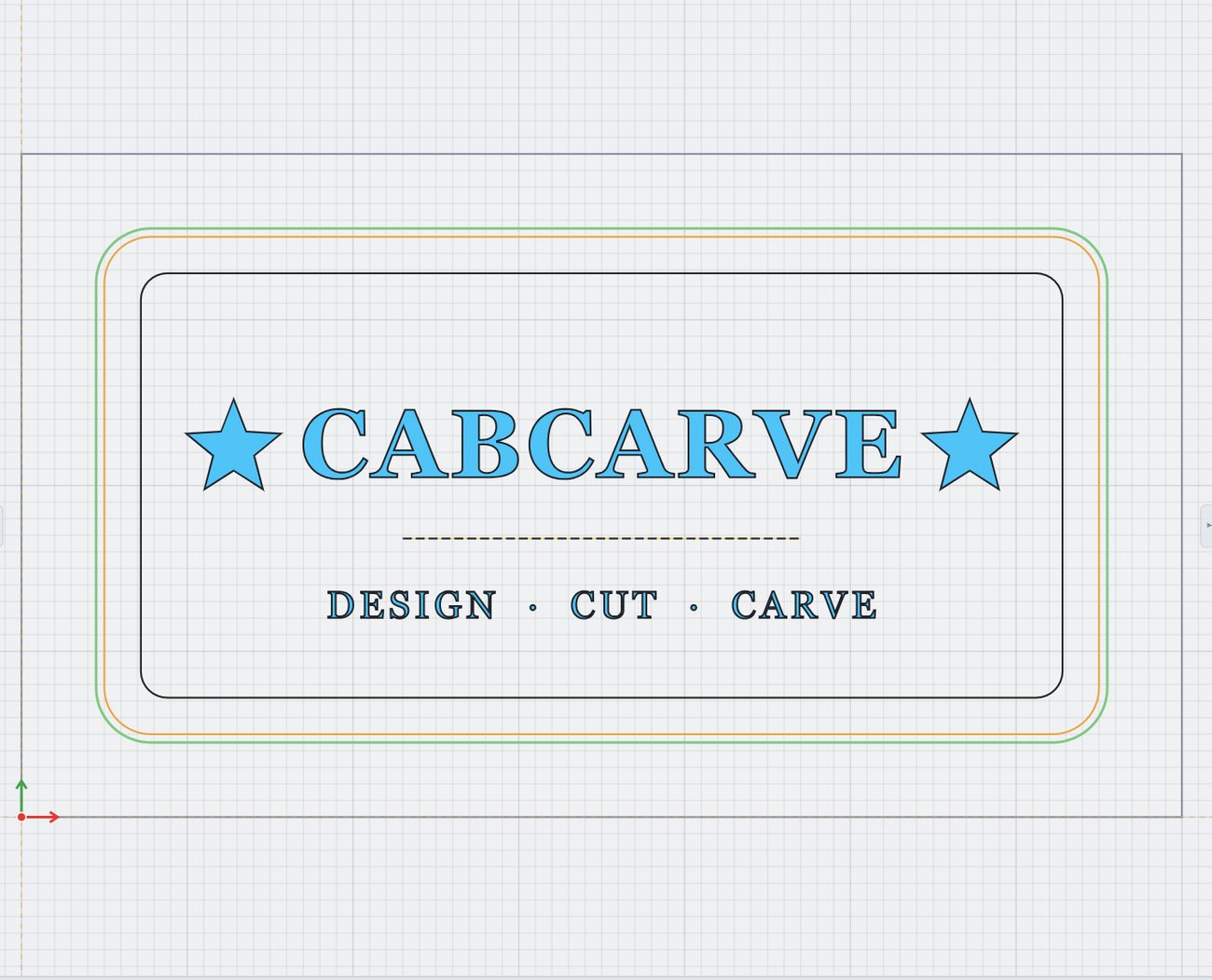
Drawing a sign with engrave, pocket and profile toolpaths
Draw or import it, pick the cutters – profile with tabs, pocket, engrave, carve

✏️ Custom parts & shapes

The heart of it: draw any part to size – curved ends, arched panels, scalloped valances, brackets, shelves, templates and jigs. Snap to points and grids, type exact sizes, round or chamfer corners, weld shapes together or cut one out of another. Bring in a DXF, SVG or PDF from a client or drafter and cut it straight away.

🔤 Signs, lettering & engraving

Any font on your computer, on a straight line or bent round a curve. Lettering is cut crisp and deep with sharp inside corners; engrave and quick-engrave run fine lines, borders and decoration. Pockets clear recesses and inlays, and profiles cut it free with holding tabs.

🌀 Shaping in 3D

Turn a flat outline into a real shape – a domed door centre, a raised panel, a curved corbel or moulding – or bring in a 3D model (STL, OBJ, GLB, 3MF) and set its size and depth. Turn a photo or sketch into a raised picture, shape it by hand – raise, lower, smooth – and join pieces into one part. A flat cutter roughs it out, a ball nose finishes it.

🎬 See it before you cut

Every toolpath previewed as it cuts, in 3D, on the real board – with the time it will take. Your own cutters, feeds and machine set-up are used, so what you see is what comes off the machine.

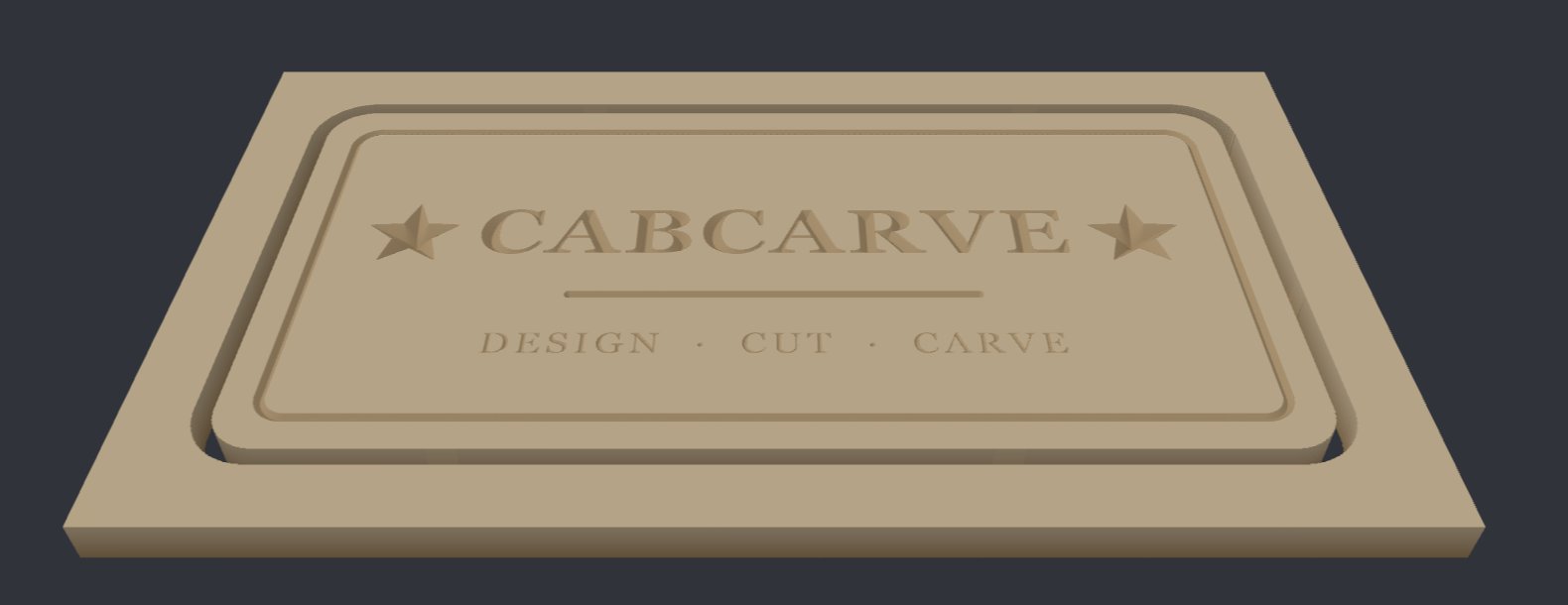
The sign as it will be cut
See the board exactly as it will come off the machine – before you cut

🪵 A real sign, start to finish

This 700 × 400 sign was drawn in minutes: the lettering and stars cut crisp and deep, a quick-engraved border and rule, then cut out with an outside profile and holding tabs. The machine time is worked out before you start.

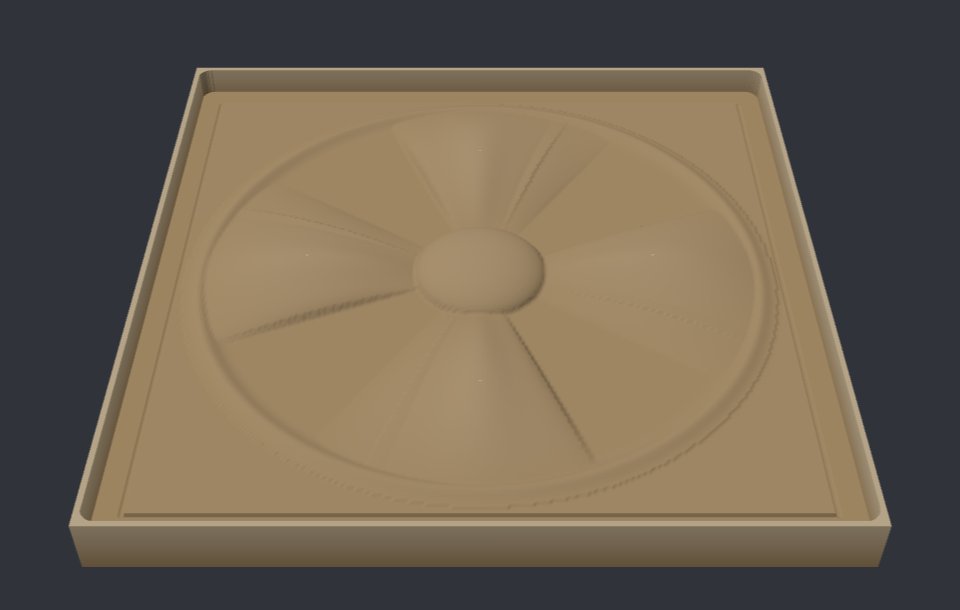
A carved 3D rosette
3D carving: bring in a model, rough it and finish it with a ball nose

🌸 Carved rosettes, panels & doors

A 270 mm rosette set 14 mm into the board: a 12 mm cutter clears the bulk, then a 3 mm ball nose follows the surface for the fine detail. Use it for door centres, corbels, mouldings and signs.

🧩 Mix 2D and 3D

Combine a carving with lettering, pockets and a profile cut on the same board – one drawing, one set of programs.

Everything included

Everything a cabinet shop needs

No modules to unlock. And it keeps growing – new options are added every month.

🏠
3D rooms & renders

Show clients the kitchen with lighting, colours, stone and timber floors.

Plans & elevations

Dimensioned drawings for the client, the installer and council – print or PDF.

🪚
Cut lists & labels

Edging, grain, part labels and hinge-press lists for the workshop floor.

⚙️
CNC ready

Your tools and your machine – grooves, pockets, rebates and drilling sorted.

✏️
Carving suite

Signs, decorative panels and 3D carving, built right in.

Your own library

Save cupboards and whole runs, and reuse them on the next job.

Panel saw optimising

No CNC? Cutting patterns for your panel saw – every cut numbered in order with its fence setting, printed cut sheets and labels.

Custom quotes

Itemised, editable, your markups and GST – printed or PDF, with deposit and balance due.

🧾
Order lists

Hardware, boards and stone ordered straight from the job.

🛠️
Report a problem

One button packs up the job so we can see exactly what you see.

Made here, for here

Australian boards and hardware, GST – and support in your time zone.

Coming updates

Face-frame cupboards, more US sheet sizes and hardware, and more machine formats – coming shortly, as free updates.

For the home workshop

Your own kitchen, laundry or shed – done properly

Not a cabinet shop? You get the same program: design it, see it in 3D, get an exact cut list and – if you have a hobby CNC – cut it yourself. One affordable program instead of a drawing app, a cut-list app and a CAM program.

  • Plan the room and drag in ready-made cupboards
  • A cut list you can take to any panel-cutting service – or cut it yourself on a panel saw with optimised cutting patterns
  • Hardware list with the hinges and runners to buy
  • Small hobby CNC routers welcome – your tool sizes, your machine
  • Signs, gifts and carvings with the built-in CAD
KitchensLaundriesWardrobesVanitiesGarage & shed storageSigns & carving
A U-shaped kitchen in sage shaker doors with rounded open ends and a curved stone top, rendered in the program
A finished kitchen drawn in CabCarveCNC – photo render
See it work

A whole kitchen, start to finish

From an empty room to a photo render for the client, then sheets ready for the machine – real jobs, no fuss.

Coming soon

Training videos

Short, step-by-step videos for every part of the program – filmed on real kitchens, free with every copy. Watch one, then do it on your own job.

Getting started · setting up your shop, boards, hardware and machine
Rooms · walls, windows, doors, ceilings and appliances
Cupboards · placing, sizing, corners, ovens, fridge panels and fillers
Build your own cupboards · change any cupboard and save it to your own library
Build your own doors · door styles, shaker frames, profiles, glass and drawer fronts
Benchtops · joins, cut-outs, shapes and waterfalls
Cornice & capping · building your own profiles and running them round a job
Lighting · downlights, pendants, LED strips, groups and photo renders
Colours & textures · boards, stone, tiles, floors and your own pictures
Build helper · typing or saying what you want and letting it lay out the kitchen
Quotes & prints · your prices, your title block, client presentations
Cut lists & optimising · sheets, offcuts and the panel saw
CNC · tools, toolpaths and sending jobs to the machine
CAD & carving · drawing and importing (DXF, PDF, pictures), custom parts and shapes, signs and 3D carving
Always improving

New options, all the time

Built alongside working shops – what you ask for goes in. A few of the latest:

New · Whole benchtop shape editor with snapping and radius corners
New · Corner units that resize and add doors as you drag
New · More 3D and custom shaping – curved, angled and round-end units
New · A fully working CAD built in – draw, carve and cut in 3D
About us

Built in a cabinet shop, not an office

CabCarveCNC comes from Snowy Cabinets in Berridale, in the Snowy Mountains of NSW – a working kitchen and joinery shop with a CNC on the floor and jobs going out the door every week.

We built it because we were sick of it. Sick of paying every month for software that never quite did what a real shop needs. Sick of being told the custom work – a carved panel, a sign, a curved or one-off piece – needs another expensive add-on or a whole second program on top. Sick of being told "that's how it works" by people who have never hung a door or scribed a filler to a crooked wall.

So our cabinet makers sat down with our own software team and built the program we wanted to use: kitchens, cut lists and CNC files, plus a full CAD and carving side for custom work – custom shaped parts, signs and engraving, 3D carving and a cutting preview – all in the one program, with no add-ons to buy. Set up the way Australian shops actually build. Every feature is tried on our own jobs and cut on our own machine before it goes out.

And because we know what it's like to run a small business, you buy it once and it's yours. No subscription, no lock-in – just a program that keeps getting better, with new options added all the time from what shops like yours ask for.

Cabinet Makerswho design, build and install kitchens every week
Our own software teambuilding it with us, in the shop, on real jobs
Tested on our own CNCevery board, hole and toolpath cut before it reaches you
AustralianAUD with GST, Aussie hardware and the way we build here
Buy onceno monthly fees – the program is yours to keep
A different way

We think this changes how shop software is sold

Most shop software has gone to monthly subscriptions: you rent it, the price keeps going up, and the day you stop paying it stops working. We think that's backwards. CabCarveCNC goes the other way – a complete program you buy once and own, that keeps getting better at no extra cost.

Typical subscription software
CabCarveCNC
Cost
A fee every month, for as long as you use it
Pay once – yours to keep
Stop paying
Locked out of your own jobs
Keeps working, always
CNC, CAD & carving
Often extra modules or a second program
All included
Updates
Only while you keep paying
Free – new options added all the time
Built by
Software companies
A working cabinet shop, tested on its own CNC
Set up for
Overseas ways of building
Australian shops, boards, hardware and GST

The cabinet makers who've seen it running so far have been really positive – and what they ask for goes straight into the next update. That's the deal: you tell us what your shop needs, and the program grows with you.

Pricing

Buy it once. Own it.

No subscription, no monthly fees, no lock-in. Pay once and the program is yours to keep – it never stops working. Try it free for 15 days first on your own jobs; printing, exporting and CNC files unlock the moment you buy.

Home workshop

$499 once
  • Design, 3D, cut lists, CNC, CAD & carving – the full toolset
  • For your own home and projects (personal use)
  • Small hobby CNC routers welcome
  • Free updates – new options added all the time
  • Upgrade to Shop any time – just pay the difference
or start the free trial

Cabinet shop

$995 once · launch price
$1,490 – save $495 while early shops come on board
  • Everything in Home, plus:
  • Quotes & invoices with your business name, logo and ABN
  • Client plans & elevations with your title block
  • Supplier order lists – hardware, boards, stone
  • Batch whole jobs for optimising and CNC runs
  • Commercial use · tax invoice with your ABN
  • Free updates and support
  • Launch price for early shops: $995 (normally $1,490)
or start the free trial

15-day free trial

Full program, free
  • Every feature on your own jobs
  • See your sheets optimised
  • Print, export & CNC files unlock when you buy
  • No card needed to start
Get the trial

Prices in AUD, including GST. Shop licences are for businesses (ABN at checkout); Home licences are for personal, non-commercial use. See the Licence Agreement.

Early access

Join the early shops

We're taking on a handful of cabinet shops and home workshops to use CabCarveCNC on real jobs and help shape what comes next. Leave your details and we'll be in touch.

Thanks – you're on the list. We'll be in touch soon.

Questions

Does it run on a Mac?

It runs on Windows 10 and 11. Many shops run it on a Mac with Windows installed alongside.

I don't have a CNC – is it still for me?

Yes. Design, quotes, drawings, cut lists and hardware lists all work without one, and the panel saw optimiser gives you numbered cutting patterns for a beam or sliding table saw.

Do you do face-frame cabinets?

Frameless cabinets are in now. Face-frame cupboards are coming shortly, along with more US sheet sizes and hardware – as free updates.

Will it work with my CNC?

Very likely. It writes G-code with your own tools, and has ready-made set-ups for the common controllers: Syntec, Mach3 / Mach4, GRBL (most hobby routers), LinuxCNC, UCCNC, MASSO, Centroid, Weihong NcStudio, handheld DSP controllers and Fanuc-style ATC routers – with or without a tool changer, and drilling heads. Need something a little different? Copy a set-up and change it yourself, with a live test program to check it and an air-cut copy to run first.

Running a nesting machine that uses its own program format rather than G-code? Tell us your machine when you sign up – we're adding those formats.

Can I set it up the way my shop builds?

Yes – board thicknesses, kicks, bulkheads, reveals, hardware, joins and machining are all settings, from the whole shop down to one cupboard.

Is it a subscription?

No. You buy it once and own it – no monthly fees, and updates are free. New options are added all the time from what shops ask for.

Do I need to be online?

No. It runs on your computer and your jobs stay on your computer.

What if I get stuck?

Press "Report a problem" in the program – it packs up the job so we can see exactly what you see – or email us.